Guides · Tutorial
Call a REST API from PowerBuilder: JSON into a DataStore and a grid, and back
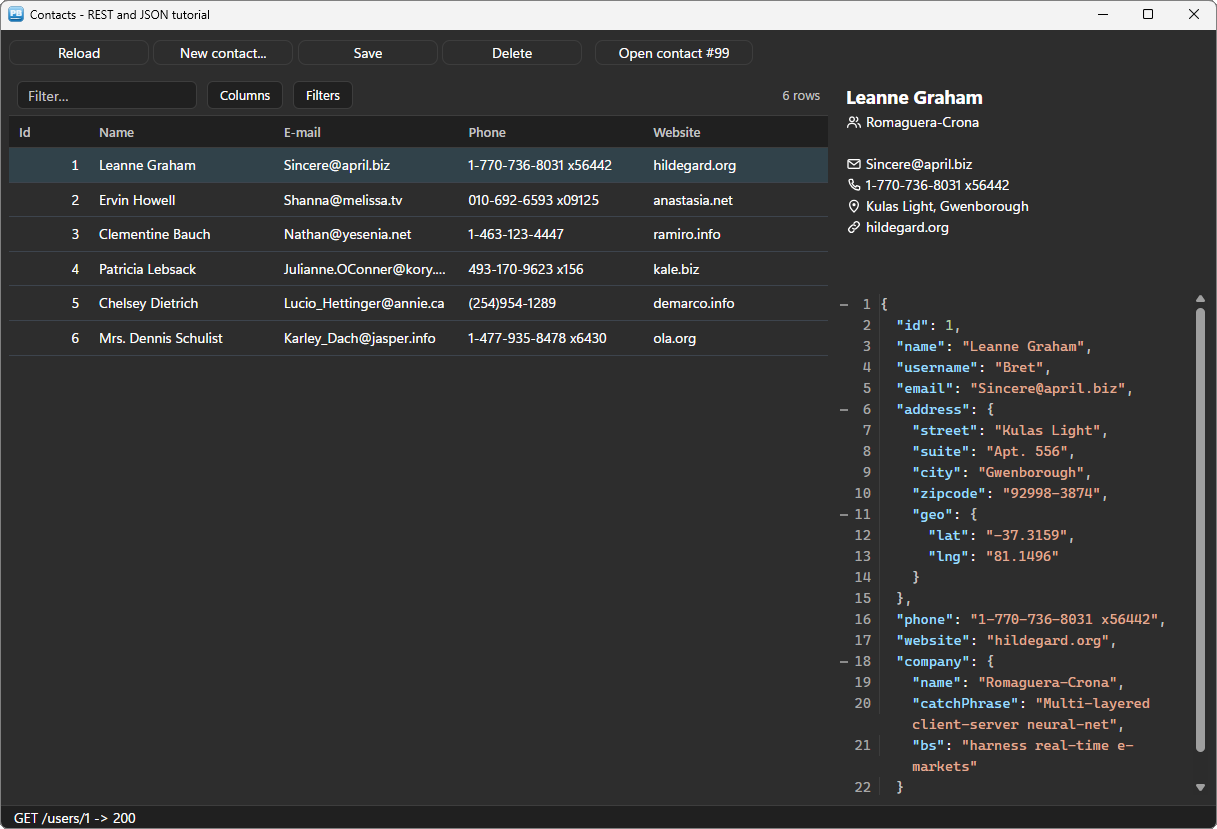
Sooner or later every PowerBuilder application has to talk to a web API: a payment provider, a carrier, the CRM of the sales team, the new microservice of the company. The versions still in production in many companies — PowerBuilder 10 to 12.6 — have no HTTP client worth the name, and no JSON parser at all. The usual answers are an OLE object of Windows, a .NET assembly, or a page in a browser control, where any company API stops at the CORS wall.
This tutorial does it with two PowerBuilder objects:
n_pbt_restclient, a native HTTPS client — the TLS, proxy and decompression of Windows, no browser page, so no CORS — with synchronous and asynchronous requests;n_pbt_json, which builds a JSON body member by member and reads an answer along a path, in pure PowerScript. It is free.
Both work the same from PowerBuilder 10.2 to 2025: the same code serves an old application and a new one.
We will build a small contact book on a public test API, JSONPlaceholder: the list of contacts straight into a DataStore and a grid, the card of a contact asked without freezing the window, a contact created, changed, deleted — and a contact that does not exist, handled properly. Every line of code below comes from the sample application: the window w_tuto_rest of the PBToolboxAI demo, opened by its Tutorials tab.
A test API. JSONPlaceholder answers like a real API —
201 Createdwith a new id,200to a change,404to an unknown contact — but it keeps nothing: a contact created or changed is not there on the next reload. Pointis_base_urlat your own API and nothing else changes.
What you need #
- PowerBuilder 10.2 → 2025 (32 or 64 bit).
- Windows 10 or 11, and an Internet connection for the test API.
- The PBToolboxAI demonstration package — free, from the downloads page. It holds
pbtoolboxai.pbl,pbtoolboxai.dlland the sample application of this tutorial.
The finished code. Open
pbtoolboxai_demo.pbwfrom the demonstration package and run it: the Tutorials tab of its ribbon opens the sample of this tutorial, the windoww_tuto_rest, with its DataWindow objectd_tuto_users. Their source is inpbtoolboxai_demo.pbl, ready to read or to copy.
Demo mode. In your own application, without a licence key, the REST client runs in demo mode: an answer is cut at 4,096 characters, and downloads are refused.
n_pbt_jsonis free and has no limit. The sample asks for six contacts at a time, which stays below the cut. The contact grid is au_pbt_datagrid, with its own demo limit (100 rows).
Step 1 — Prepare the target #
- Copy
pbtoolboxai.pblinto your application folder and add it to the library list of your target. - Copy
pbtoolboxai.dll— the x86 copy, since the PowerBuilder IDE is 32-bit — next topbXXX.exeor into the working folder of the target, so that the IDE finds it when you run.
Step 2 — The application object #
Declare two functions of the DLL, then set the licence and the theme before the first window opens:
// Local External Functions of the application object
Function long PBT_SetLicense (string as_client, string as_key) Library "pbtoolboxai.dll"
Function long PBT_SetDefaultTheme (string as_name) Library "pbtoolboxai.dll"
// open event of the application object
// Your licence key. Without one the REST client runs in demo mode :
// answers cut at 4,096 characters, no download
PBT_SetLicense(/*client*/ "Your company", /*key*/ "your-licence-key")
// The theme of the components of the window (the grid, the card and the JSON tree)
PBT_SetDefaultTheme(/*name*/ "fluent-dark")
Open(w_contacts)Step 3 — One client for the window #
The client raises events — an answer arrived, a request failed — so the window holds it as a non-visual object of its own, where those events are scripted. In the window painter, insert a non-visual object of class n_pbt_restclient and name it inv_rest. Then, when the window opens, tell it who it works for and where the API is:
// open event of the window

inv_mb = create n_pbt_messagebox

// The client works for this window (its licence is checked on the window's class),
// and every relative URL starts with the address of the API
inv_rest.ipo_owner = this
inv_rest.is_base_url = "https://jsonplaceholder.typicode.com"

// The contacts live in a DataStore ; the grid selects one row at a time, and the
// name, the e-mail and the phone are edited in place, written back into the DataStore
ids_users = create datastore
ids_users.DataObject = "d_tuto_users"
uo_users.is_selection_mode = uo_users.SELECT_SINGLE
uo_users.ib_write_back = true

wf_layout()
wf_load()

// The editable columns : the grid exists once the DataStore was read. The id is short.
uo_users.of_column(/*key*/ "id").ii_width = 60
uo_users.of_column(/*key*/ "name").ib_editable = true
uo_users.of_column(/*key*/ "email").ib_editable = true
uo_users.of_column(/*key*/ "phone").ib_editable = true
is_base_url is put in front of every relative URL: the rest of the code only writes /users, /users/3. One line changes to move from the test server to production. Real APIs usually want more — of_set_bearer(token), of_set_basic(user, password), of_set_header(name, value) — set once, sent with every request.
The rest of the window: a u_pbt_datagrid named uo_users for the list, a DataStore ids_users (an instance variable) that holds it, a u_pbt_statictext named uo_detail for the card of a contact, a u_pbt_jsontree named uo_json that shows the raw answer, five u_pbt_button and a u_pbt_statusbar. inv_mb is the themed message box of the dialogs tutorial.
Step 4 — A list straight into a DataStore, shown by a grid #
The DataWindow object d_tuto_users is an ordinary grid with external columns, named like the members of the JSON objects the API returns: id, name, email, phone, website. That is the whole mapping. of_retrieve does the rest — the GET, the parsing, one row per object:
// wf_load ()

// Local variables
string ls_names[], ls_values[]
long ll_rows

// The query of the URL is built by of_url : every name and value is encoded.
// Six contacts : a page of the list, as a real API would serve it.
ls_names[1] = "_limit"
ls_values[1] = "6"

// GET, then the array of the answer straight into the DataStore : one row per
// object, each member in the column of the same name, as Retrieve does
ll_rows = inv_rest.of_retrieve(/*target*/ ids_users, /*url*/ inv_rest.of_url(/*path*/ "/users", /*names*/ ls_names, /*values*/ ls_values))
if ll_rows < 0 then
	wf_status("GET /users failed: " + inv_rest.is_last_error)
	inv_mb.of_messagebox(Handle(this), "Contacts", "The contacts could not be loaded.~r~n~r~n" + inv_rest.is_last_error, StopSign!, OK!, 1)
	return
end if

// The grid reads the DataStore : titles, rows. The columns keep what was set on them.
uo_users.of_from_datastore(/*ads*/ ids_users)

// The raw answer, as a tree : what the API really sent
uo_json.is_json = inv_rest.is_response_text
wf_status("GET /users -> " + String(inv_rest.il_status) + ", " + String(ll_rows) + " contacts")
The grid takes its column titles from the headers of the DataWindow object, and names each row by its RowID: a key that does not move when rows are inserted or deleted.
Like Retrieve, of_retrieve empties the DataStore first, then returns the number of rows, and the rows come in not modified. A member that names no column is ignored — the API sends username, address, company too — and each value is converted to the type of its column: a number from a number, a date from an ISO text. An answer that is an object with the array inside it is read with a path: of_retrieve(dw, "/orders", "data/items").
A negative return says what went wrong, and is_last_error says why: -4 when the answer is not a 2xx or not JSON, -5 for an invalid URL. The same method fills a DataWindow control, or the datawindowchild of a drop-down list.
of_url matters as soon as a value comes from the user: a search typed with a & or a # would otherwise break the URL. It encodes every name and every value.
Step 5 — One record, without freezing the window #
of_retrieve waits for the answer, which suits a list loaded once. The card of a contact is asked every time the selection changes: it must not freeze the grid while the network answers. of_get_async returns at once with a request id; the answer comes later, in the ue_response event of the client.
// ue_selection_changed event of uo_users : (string as_keys_json)
// Local variables
long ll_quote, ll_end, ll_row

// '["3"]' : the RowID of the row selected, '[]' when there is none
ll_quote = Pos(as_keys_json, '"')
if ll_quote = 0 then return
ll_end = Pos(as_keys_json, '"', ll_quote + 1)
ll_row = parent.ids_users.GetRowFromRowId(Long(Mid(as_keys_json, ll_quote + 1, ll_end - ll_quote - 1)))
if ll_row < 1 or ll_row = parent.il_row then return

// Another contact : its card is asked to the API
parent.il_row = ll_row
parent.wf_open_contact(parent.ids_users.GetItemNumber(ll_row, "id"))
// wf_open_contact (long al_contact)
// One contact, asked without waiting : the window stays live while the answer comes.
// The answer arrives in ue_response of inv_rest, recognised by this id.
il_detail_contact = al_contact
il_detail_request = inv_rest.of_get_async(/*url*/ "/users/" + String(al_contact))
uo_detail.is_text = "[i]Loading contact #" + String(al_contact) + "...[/i]"Every answer arrives in one event. The window keeps the id of each kind of request in an instance variable, and the event dispatches on it:
// ue_response event of inv_rest : (long al_id, long al_status)

// Local variables
string ls_body

// Every answer : its body, read HERE (the request is forgotten once the event returns),
// shown raw in the tree. Then the id says which request it answers.
ls_body = this.of_response_text(/*id*/ al_id)
parent.uo_json.is_json = ls_body
if al_id = parent.il_detail_request then
	parent.wf_show_contact(al_status, ls_body)
elseif al_id = parent.il_create_request then
	parent.wf_created(al_status, this.of_json_value(/*id*/ al_id, /*path*/ "id"))
elseif al_id = parent.il_save_request then
	parent.wf_status("PUT -> " + String(al_status) + ", contact saved")
elseif al_id = parent.il_delete_request then
	parent.wf_deleted(al_status)
end if
You wire nothing else: no timer, no user event mapped to a Windows message. The client delivers its answers by itself, on the PowerBuilder thread, while a request is on its way. A user who clicks through the rows quickly sends several requests; an answer to an older one carries an id that is no longer il_detail_request, and is simply not shown as the card.
Step 6 — Read the answer by path #
The card needs values that are not columns of the grid: the company and the address are nested objects of the answer. n_pbt_json loads the body once and reads any value by its path, levels joined by /:
// wf_show_contact (long al_status, string as_body) - the 2xx case

// The body is read by path : levels joined by "/", nested objects included
lnv_json.of_load(/*json*/ as_body)
if not lnv_json.ib_valid then
	uo_detail.is_text = "[b]The answer is not JSON[/b][br]" + inv_utils.of_escape_markup(lnv_json.is_last_error)
	return
end if

// A card in rich text : every value comes from the API, so every value is escaped
ls_text = "[size=14][b]" + inv_utils.of_escape_markup(lnv_json.of_get_string(/*path*/ "name")) + "[/b][/size][br]"
ls_text += "[symbol=people] " + inv_utils.of_escape_markup(lnv_json.of_get_string(/*path*/ "company/name")) + "[br][br]"
ls_text += "[symbol=mail] " + inv_utils.of_escape_markup(lnv_json.of_get_string(/*path*/ "email")) + "[br]"
ls_text += "[symbol=phone] " + inv_utils.of_escape_markup(lnv_json.of_get_string(/*path*/ "phone")) + "[br]"
ls_text += "[symbol=location] " + inv_utils.of_escape_markup(lnv_json.of_get_string(/*path*/ "address/street")) &
	+ ", " + inv_utils.of_escape_markup(lnv_json.of_get_string(/*path*/ "address/city")) + "[br]"
ls_text += "[symbol=link] " + inv_utils.of_escape_markup(lnv_json.of_get_string(/*path*/ "website"))
uo_detail.is_text = ls_text
n_pbt_json is autoinstantiated: declare n_pbt_json lnv_json and use it, nothing to create or destroy. What it gives:
of_get_stringreturns a string decoded — accents, quotes,\n— a number or a boolean as text, and an object or an array as JSON you can load again.of_get_number,of_get_boolean,of_get_datereturn typed values.- An array is crossed by position, from 1:
items/1/qty.of_count("items")says how many;of_existsandof_typeask before reading. ib_validafterof_load: a body that is not JSON — a proxy's HTML error page, say — is told apart instead of read as empty values.
The card itself is a free u_pbt_statictext: rich text, with [symbol=…] glyphs drawn in the colour of the text. A value that comes from an API is data: of_escape_markup (of the autoinstantiated n_pbt_utils) keeps a bracket in a name from being read as markup.
Step 7 — An answer is not always a success #
Two very different things can go wrong, and they arrive by two different roads.
The server answered, with an error status. That is still an answer: it comes to ue_response, and al_status says what happened. Open contact #99 asks for a contact that does not exist:
// wf_show_contact - a status outside 2xx is an answer too
if al_status = 404 then
	uo_detail.is_text = "[b]Contact #" + String(il_detail_contact) + " not found[/b][br][br]" &
		+ "The API answered [accent]404[/accent]: there is no such contact."
	return
end if
if al_status < 200 or al_status >= 300 then
	uo_detail.is_text = "[b]The API answered " + String(al_status) + "[/b]"
	return
end if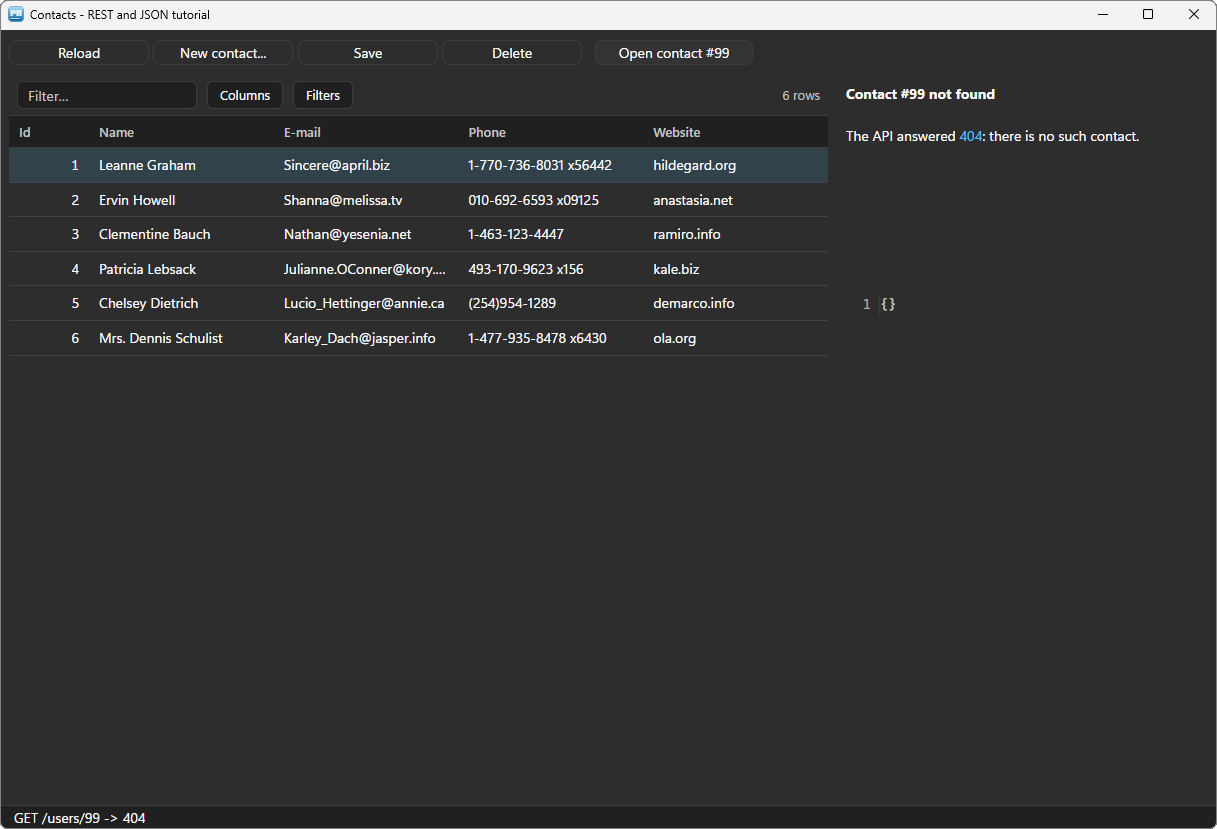
There was no answer at all: no network, a timeout, a certificate refused. That comes to ue_failed, with the reason:
// ue_failed event of inv_rest : (long al_id, long al_code, string as_error)

// No answer at all : no network, a timeout, a certificate refused...
parent.wf_status("The request failed: " + as_error)
parent.inv_mb.of_messagebox(Handle(parent), "Contacts", "The server could not be reached.~r~n~r~n" + as_error, StopSign!, OK!, 1)
Keep the two apart in your code: a 404 or a 409 is a business answer the user can act on, a failure is a problem of infrastructure. For a synchronous call the same distinction is the return value: the HTTP status when the server answered, a negative code when it did not. il_timeout_ms (30 seconds by default) bounds the waiting, and il_max_retries tries an async request again on 429, 503 or a network failure — never a POST whose answer was lost, which the server may have processed.
Step 8 — Send JSON: create a contact #
A POST needs a body. Concatenating JSON by hand is how quotes in a name break a request; n_pbt_json builds it member by member, escapes every value, and creates the nested objects that a path names:
// wf_new ()

// Local variables
n_pbt_json lnv_json
string ls_name

// One line asks for the name : "" means the user cancelled
ls_name = inv_mb.of_prompt(/*hwnd*/ Handle(this), /*title*/ "New contact", /*message*/ "Name of the new contact:", /*default*/ "", /*password*/ false, /*required*/ true)
if ls_name = "" then return

// The body, built member by member : the escaping is done for you, and a path with
// levels creates the nested objects
lnv_json.of_set_string(/*path*/ "name", /*value*/ ls_name)
lnv_json.of_set_string(/*path*/ "email", /*value*/ "[email protected]")
lnv_json.of_set_string(/*path*/ "address/city", /*value*/ "Lyon")
lnv_json.of_set_boolean(/*path*/ "active", /*value*/ true)

// POST without waiting : the answer comes in ue_response
il_create_request = inv_rest.of_post_async(/*url*/ "/users", /*body*/ lnv_json.is_text)
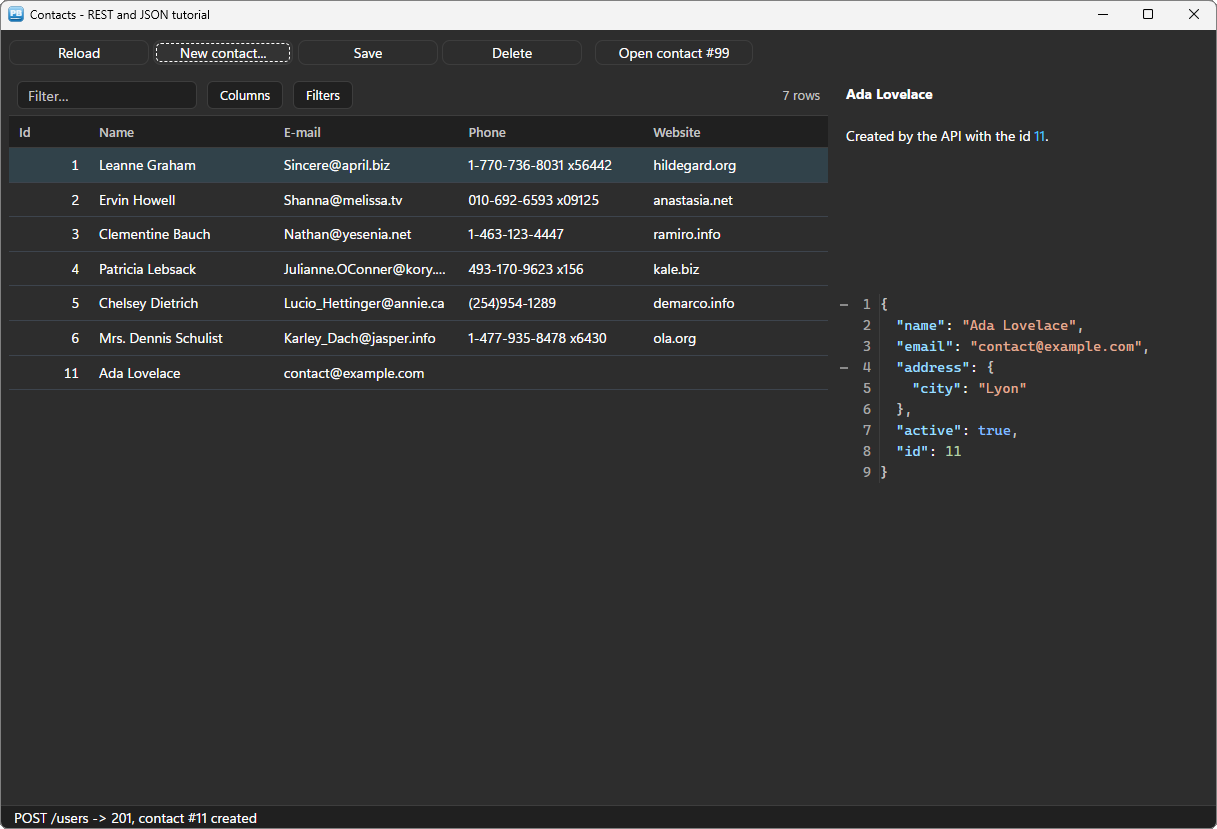
lnv_json.is_text is the finished document: {"name":"Ada Lovelace","email":"[email protected]","address":{"city":"Lyon"},"active":true}. The client sends it as application/json.
The API answers 201 Created with the new contact and its id. One value of an answer does not need an n_pbt_json: of_json_value(id, path) reads it straight from the response, as ue_response did above for "id":
// wf_created (long al_status, string as_id)

// 201 Created : the API gave the contact its id, read straight from the answer
if al_status <> 201 then
	inv_mb.of_messagebox(Handle(this), "New contact", "The contact was refused (" + String(al_status) + ").", Exclamation!, OK!, 1)
	return
end if

// A new row at the end of the DataStore, then the grid reads it again ; the reload
// empties the selection, so the current contact is selected again
ll_current = il_row
ll_row = ids_users.InsertRow(0)
ids_users.SetItem(ll_row, "id", Long(as_id))
ids_users.SetItem(ll_row, "name", inv_rest.of_json_value(/*id*/ il_create_request, /*path*/ "name"))
ids_users.SetItem(ll_row, "email", inv_rest.of_json_value(/*id*/ il_create_request, /*path*/ "email"))
uo_users.of_from_datastore(/*ads*/ ids_users)
wf_select(ll_current)
wf_select(row) selects a row by its RowID: uo_users.of_select_rows('["' + String(ids_users.GetRowIdFromRow(al_row)) + '"]').
Step 9 — Change and delete #
The name, the e-mail and the phone are edited in the grid: a double-click (or F2) opens the cell, Enter validates. With ib_write_back, the grid writes the value into the DataStore before it raises ue_cell_edited — the DataStore stays the master. Save sends the selected row back with a PUT. The row becomes a JSON object, typed member by member:
// wf_save ()

// The grid wrote every edit into the DataStore already (ib_write_back)
ll_row = il_row
if ll_row < 1 then return
ll_contact = ids_users.GetItemNumber(ll_row, "id")

// The row as a JSON object : typed members, escaped values
lnv_json.of_set_number(/*path*/ "id", /*value*/ ll_contact)
lnv_json.of_set_string(/*path*/ "name", /*value*/ ids_users.GetItemString(ll_row, "name"))
lnv_json.of_set_string(/*path*/ "email", /*value*/ ids_users.GetItemString(ll_row, "email"))
lnv_json.of_set_string(/*path*/ "phone", /*value*/ ids_users.GetItemString(ll_row, "phone"))

// PUT replaces the contact on the server
il_save_request = inv_rest.of_put_async(/*url*/ "/users/" + String(ll_contact), /*body*/ lnv_json.is_text)
For a whole DataStore, lnv_json.of_from_datastore("orders", lds_orders) writes every row as an object of an array in one call — and of_to_datastore does the reverse.
Delete asks first, then removes the row only once the server agreed:
// wf_delete ()

// A destructive action : ask first
if inv_mb.of_messagebox(Handle(this), "Delete", "Delete " + ids_users.GetItemString(il_delete_row, "name") + " on the server?", Question!, YesNo!, 2) <> 1 then return

il_delete_request = inv_rest.of_delete_async(/*url*/ "/users/" + String(ll_contact))
// wf_deleted (long al_status) - called from ue_response
// The row leaves the list once the server agreed : out of the DataStore, then out of
// the grid by its key, and the next contact is selected
if al_status >= 200 and al_status < 300 then
ls_name = ids_users.GetItemString(il_delete_row, "name")
ls_key = String(ids_users.GetRowIdFromRow(il_delete_row))
ids_users.DeleteRow(il_delete_row)
uo_users.of_remove_row(/*key*/ ls_key)
wf_select(Min(il_delete_row, ids_users.RowCount()))
uo_detail.is_text = "[b]" + inv_utils.of_escape_markup(ls_name) + "[/b] was deleted on the server."
end ifThe order matters: the grid follows the server, never the other way round. Deleting the row first and calling the API after would leave a contact on the server that the screen no longer shows the moment the network fails.
The raw answer, and the theme #
The JSON tree on the right is u_pbt_jsontree: it shows any JSON text as a folding, coloured document — one line, uo_json.is_json = ls_body. In a real application it is a debugging aid you can leave in an About or Diagnostics screen; here it shows that the card, the grid and the API agree.
The grid, the card and the tree follow the theme set by PBT_SetDefaultTheme, dark included. The ue_bg_color event of the card reports the background of the theme, and the window gives it to itself — the status bar follows the theme by itself — as in the docking tutorial.
Deploying #
Next to your executable, ship:
my_app.exe
pbtoolboxai.dll     <- the x86 or the x64 copy, matching your build
The DLL has the same name in 32 and 64 bit: you develop in the 32-bit IDE and compile a 64-bit executable without changing a line of PowerScript — only the copied file changes. Nothing else to install: the HTTPS stack is the one of Windows, with its certificates and its proxy settings. Call PBT_SetLicense with your key in the application open event, and the 4,096-character cut goes away.
Going further #
- Authentication:
of_set_bearerfor a token,of_set_basicfor a user and a password,of_oauth_client_credentialsfor an API behind OAuth2 — the token is asked once and renewed a minute before it expires.ib_windows_authsigns in with the Windows account on an intranet. - Files:
of_download_asyncwrites a file to disk as it arrives,of_uploadsends one as a form, andue_progressreports both. - Forms:
of_post_formfor the APIs that wantapplication/x-www-form-urlencoded. - Long requests:
of_cancel(id)stops an async request;il_total_timeout_msbounds the whole exchange. - Diagnostics:
is_last_requestholds what the last request asked for, its secrets masked — ready to paste into a support ticket.
Every method, property and event is in the REST client reference, the JSON reference and the JSON tree reference.
And if you write PowerScript with Claude, Cursor or VS Code, connect them to the PBToolboxAI documentation MCP server: your assistant then looks up the exact API instead of guessing, and checks the code it proposes. The code of this tutorial was checked that way.
Download: the PBToolboxAI demonstration package — free: the library, the DLL, and the sample of this tutorial in the Tutorials tab of the demo.